


If you want to connect old machines, sensors, PLCs, and cloud platforms in your factory, you’ve probably run into one big problem: different devices speak different languages. Older equipment—think legacy lathes, analog sensors, or vintage PLCs—relies on serial ports and outdated protocols like Modbus RTU or RS-485. Newer systems, on the other hand, use Ethernet, Wi-Fi, and cloud-native protocols that talk directly to platforms like AWS IoT or Azure IoT. Trying to make these mismatched devices communicate without the right tool leads to missed data, broken connections, hours of troubleshooting, and even costly downtime. It’s like trying to have a conversation with someone who speaks a completely different language—frustrating, inefficient, and ultimately unproductive.
An industrial IoT gateway solves this exact problem. It acts as a translator, a bridge, and a traffic controller all in one—connecting field devices (old and new) to upper systems (cloud platforms, SCADA, MES) while ensuring data flows smoothly, reliably, and securely. After setting up IoT solutions for more than 20 factories—from small manufacturing plants to large-scale smart factories—I can say this with absolute certainty: A reliable industrial IoT gateway is not an extra device or a “nice-to-have” upgrade. It’s the foundation of a smart factory, the glue that holds your entire connected system together, and the key to unlocking real efficiency gains.
In this guide, I’ll break down exactly what an industrial IoT gateway does (beyond just “connecting devices”), the real-world problems it solves (with examples from factories I’ve worked with), how to choose the right one for your setup, and why skipping it will hold back your smart factory goals. No jargon, no fluff—just practical, firsthand advice from someone who’s been in your shoes.

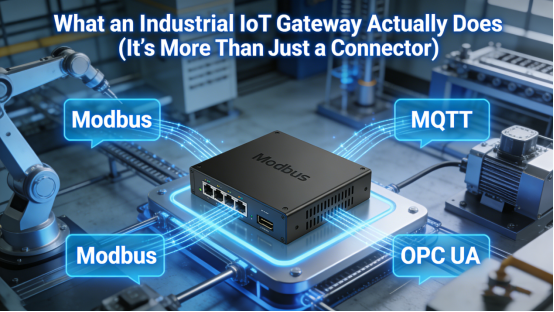
What an Industrial IoT Gateway Actually Does (It’s More Than Just a Connector)
Many factory managers and even some engineers think an IoT gateway is just a simple “plug-and-play” connector—something that links a sensor to the cloud. In reality, it performs four critical, non-negotiable tasks that keep your smart factory running smoothly. These tasks are what separate a reliable IoT system from one that’s constantly failing or underperforming:
1. Protocol Conversion (The “Translator” Role)
The biggest challenge in connecting factory devices is that they use different protocols—think of protocols as different languages. A legacy pump might use Modbus RTU over RS-485, a new sensor might use MQTT over Ethernet, and a PLC might use CAN bus. Without a translator, these devices can’t “talk” to each other or to your cloud platform. An industrial IoT gateway translates these diverse industrial protocols into standard, universal formats (like MQTT, HTTP, or TCP/IP) that your cloud system or SCADA software can understand. This means you don’t have to replace all your old equipment to go smart—you just need a gateway to bridge the language gap.
2. Edge Computing (The “Traffic Cop” Role)
If every sensor and machine sent every piece of data directly to the cloud, your network would get overloaded, and your cloud costs would skyrocket. Worse, you’d face delays in data processing—critical for real-time decisions like stopping a faulty machine. An industrial IoT gateway performs edge computing: it processes, filters, and analyzes data locally (right at the factory floor) before sending only the most important information to the cloud. For example, a gateway might monitor a machine’s temperature and only send an alert to the cloud if the temperature exceeds a safe threshold. This reduces network traffic, lowers cloud costs, and ensures you get actionable data faster.
3. Stable Data Transmission (The “Reliability Guard” Role)
Factory environments are tough on networks. Wi-Fi signals can be spotty, internet connections can drop, and electrical interference can disrupt data flow. An industrial IoT gateway solves this with redundant network options—most support 4G, Wi-Fi, and wired Ethernet—so if one connection fails, it automatically switches to another. It also includes local data storage: if the network goes down entirely, the gateway stores data locally and resends it automatically once the connection is restored. No more lost production data, no more gaps in your analytics, and no more manually re-entering data after a network outage.
4. Remote Device Management (The “Time-Saver” Role)
Before industrial IoT gateways, factory engineers had to physically walk to each machine to check status, diagnose faults, or perform upgrades. This wasted hours of valuable time—especially in large factories with dozens of machines spread across multiple floors or buildings. An industrial IoT gateway lets you monitor, debug, and upgrade devices remotely from a single dashboard. You can check a machine’s performance from your office, adjust settings from home, or even troubleshoot a fault without sending an engineer to the field. This cuts maintenance time, reduces labor costs, and keeps your factory running even when your team isn’t on-site.
This is what makes smart factories truly “smart”—not just adding sensors or buying new equipment, but connecting everything reliably and turning raw data into actionable insights. And none of that is possible without an industrial IoT gateway.
4 Real Problems Fixed by an Industrial IoT Gateway (From My Factory Experience)
To give you a better sense of how impactful an industrial IoT gateway can be, here are four common problems I’ve seen in factories—along with how a gateway solved them. These aren’t manufacturer claims; they’re real results from real factories I’ve helped upgrade:
1. Old Machines Can’t Send Data to the Cloud (Wasting Valuable Insights)
A food processing plant I worked with had 10 legacy packaging machines—each 15+ years old—with no network capabilities. They wanted to track production output, machine downtime, and maintenance needs in real time, but the machines couldn’t send data to their cloud platform. Replacing the machines would have cost $500,000+, which was out of their budget. We installed industrial IoT gateways to connect the machines via their RS-485 ports, translating their legacy protocol to MQTT. Within a month, they were able to track real-time output, identify bottlenecks in the packaging line, and reduce downtime by 25%. They saved money on new machines and gained valuable insights they never had before.
2. Too Many Protocols That Don’t Work Together (Creating Data Silos)
A automotive parts factory had a mix of devices: old sensors using Modbus RTU, new robots using Ethernet/IP, and a PLC using CAN bus. Their systems couldn’t communicate, so they had separate dashboards for each device—meaning managers had to jump between screens to get a complete picture of production. This led to missed bottlenecks and delayed decisions. We installed a single industrial IoT gateway that unified all protocols into one data stream. Now, managers have a single dashboard showing all device data, and they can make real-time decisions to optimize production. This reduced data entry errors by 30% and saved managers 2+ hours per day of dashboard switching.
3. Unstable Network Causes Data Loss (Hurting Analytics and Compliance)
A pharmaceutical factory needed to track temperature and humidity in their production area for compliance purposes. Their existing system used Wi-Fi-connected sensors, but the Wi-Fi signal was spotty in parts of the factory—leading to lost data logs. This put them at risk of failing regulatory audits. We installed industrial IoT gateways with dual SIM 4G and local data storage. Now, if the Wi-Fi drops, the gateway switches to 4G; if both networks fail, it stores data locally and resends it once the connection is back. They haven’t lost a single data point since, and they passed their next audit with zero issues.
4. Engineers Waste Time On-Site Troubleshooting (Increasing Labor Costs)
A large manufacturing plant with 50+ machines had engineers spending 40% of their time walking to machines to troubleshoot faults or check status. This was costly and inefficient—especially when faults were minor and could be fixed remotely. We installed industrial IoT gateways with remote management capabilities. Now, engineers can monitor machine parameters, diagnose faults, and adjust settings from their office. This cut on-site troubleshooting time by 60%, reduced labor costs by $80,000 per year, and let engineers focus on more critical tasks like preventive maintenance.

How to Choose the Right Industrial IoT Gateway (5 Key Factors That Matter)
Not all industrial IoT gateways are built the same. I’ve seen factories waste money on cheap, consumer-grade gateways that fail in industrial environments, or gateways that don’t support their specific protocols. Here are the 5 key factors to look for when choosing a gateway—based on what I’ve learned from 20+ factory setups:
1. Protocol Support (Non-Negotiable)
First and foremost, make sure the gateway supports all the protocols your devices use. This includes legacy protocols (Modbus RTU, RS-485, CAN bus) and modern protocols (MQTT, Ethernet/IP, OPC UA). If a gateway doesn’t support your devices’ protocols, it won’t work—no matter how advanced it is. Top manufacturers like Jiangxi Qiwo Electronics offer gateways with customizable protocol support, so you can match it exactly to your factory’s needs.
2. Network Redundancy (For Reliability)
Look for gateways with multiple network options: 4G (dual SIM is even better), Wi-Fi, and wired Ethernet. Redundant networks ensure that if one connection fails, the gateway switches to another—so your data never stops flowing. This is critical for factories where network stability is hit-or-miss.
3. Industrial-Grade Durability (Built for Factory Environments)
Consumer-grade gateways won’t survive in factories—they’ll overheat, fail from vibration, or get damaged by dust and moisture. Choose an industrial IoT gateway with a fanless design (no dust buildup), IP65+ protection (dust-tight and water-resistant), shock resistance (1.5m drop test), and a wide temperature range (-40°C to 70°C). This ensures it can handle the harsh conditions of factory floors.
4. Edge Computing Capabilities (To Reduce Costs)
Not all gateways offer edge computing—some just pass data through to the cloud. Look for a gateway that can process, filter, and analyze data locally. This reduces network traffic, lowers cloud storage costs, and ensures you get real-time insights without delays.
5. Remote Management (To Save Time)
Choose a gateway with built-in remote management capabilities—like web-based dashboards, SSH access, or cloud integration. This lets you monitor and manage the gateway (and connected devices) from anywhere, without having to be on-site. It’s a huge time-saver for busy factory teams.

Final Thoughts: The Gateway Is the Heart of Your Smart Factory
If you want to build a smart factory, improve efficiency, reduce downtime, and unlock the full potential of your devices—old and new—you need an industrial IoT gateway. It’s not a luxury; it’s a necessity. It turns isolated machines into a connected system, messy data into usable information, and reactive maintenance into proactive management.
You don’t need to replace all your equipment to go smart. You don’t need to spend millions on a complete overhaul. You just need the right bridge between your devices and your systems—and that’s exactly what an industrial IoT gateway provides. After helping 20+ factories make the switch, I’ve seen firsthand how a single gateway can transform a factory’s efficiency, reduce costs, and set the stage for long-term smart growth.
Ready to take your smart factory to the next level? Request a free hands-on demo today—Jiangxi Qiwo will show you how their industrial IoT gateways work with your specific factory setup, walk you through protocol support and customization options, and help you pick the right model for your budget and needs. They even offer a 30-day trial, so you can test the gateway in your factory before committing. No hype, no pressure—just a reliable solution to your smart factory connectivity headaches.
