

Let’s talk about something that’s often overlooked but *super* important: how your team actually interacts with factory equipment.
You walk into a factory, and what do you see? PLCs, sensors, machines—all working hard—but the *people* running them are stuck with clunky, outdated interfaces. Buttons that stick. Screens that are hard to read. Menus that take forever to navigate.
Sound familiar?
If you’re a factory manager or engineer, you know this pain:your equipment is great, but the interface holding it back is holding your team back. Slow workflows. Frustrated technicians. Mistakes that cost time and money.
But here’s the good news: There’s a simple solution. An Industrial HMI (Human-Machine Interface) can turn your factory’s daily operations from a chore into a breeze. It’s not about fancy tech—it’s about giving your team the tools they need to work smarter, not harder.
In this post, I’m keeping it light, practical, and *super* actionable. No confusing jargon. Just the straight facts you need to know to upgrade your HMI and boost your factory’s efficiency. Let’s dive in!

What Is an Industrial HMI, Anyway? (1-Minute explainer)
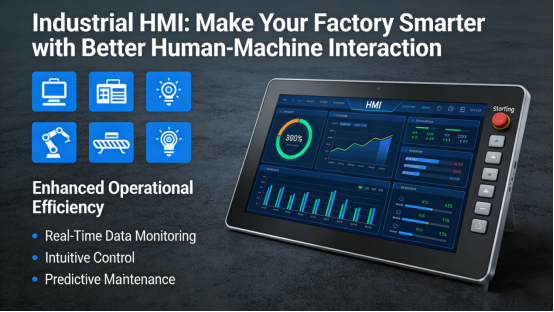
Let’s keep it simple. An Industrial HMI is a touchscreen (or physical interface) that lets your team *communicate directly* with factory equipment—PLCs, machines, sensors, control systems, you name it.
Think of it like this:
- Your factory equipment is the “brain” doing all the work.
- Your team is the “hands” running the show.
- An Industrial HMI is the “face” that lets them talk to each other—clearly, quickly, and easily.
Unlike old interfaces—think clunky buttons, tiny screens, or confusing menus—a modern Industrial HMI is:
- Intuitive: Easy to learn, even for new technicians.
- Fast: Get to the data or controls you need in 1 tap.
- Rugged: Built to survive factory dust, moisture, and vibration.
- Connected: Works with all your existing equipment, no replacements needed.
It’s not rocket science. It’s just making sure your team can focus on *doing their job* instead of fighting with the interface.

Why Your Current HMI (or Lack Thereof) Is Holding You Back
I’ve seen hundreds of factories stuck with outdated HMIs—and the cost is real. Here are the 3 biggest ways a bad interface is hurting your bottom line:
1. Slow Workflows = Lost Time
If your team has to navigate 5 menus to start a machine or check a temperature reading, that’s 10–15 seconds *every time*. Multiply that by 100 operations a day, and you’re looking at hours of lost productivity—time that could be spent on more important tasks.
A modern Industrial HMI fixes this with:
- One-tap access: Key controls and data are front and center.
- Customizable layouts: Design the interface to match how your team works.
- Alerts at a glance: Critical warnings pop up instantly, no digging required.
2. Frustrated Teams = More Mistakes
When an interface is hard to use, your team gets stressed. Stressed teams make mistakes.
I’ve seen a factory mix up production batches because a technician accidentally pressed the wrong button on an old HMI. That’s a $2,000 mistake—*one time*.
A good HMI reduces errors by:
- Clear, large buttons: No more tiny, hard-to-see controls.
- Visual feedback: Confirmations and prompts so you *know* you pressed the right thing.
- Multilingual support: If your team speaks multiple languages, the HMI can too.
3. Outdated Interfaces = No Data (or Bad Data)
If your HMI can’t send data to your cloud platform or SCADA system, you’re flying blind.
You can’t optimize production, fix issues early, or comply with regulations if you don’t have real-time data.
A modern Industrial HMI solves this by:
- Real-time data streaming: Send temperature, pressure, speed, and more to your cloud or SCADA in seconds.
- Automated reports: Generate daily/weekly reports with one click—no more manual spreadsheets.
- Remote access: Monitor and adjust settings from anywhere—office, home, or the shop floor.

3 Real Factory Scenarios Where an Industrial HMI Makes a Difference
Let’s get concrete. Here are 3 common factory problems that an Industrial HMI fixes—*fast*:
Scenario 1: Food Processing Plant (Temperature Control Nightmare)
A food processing plant was using old analog gauges to track oven temperatures. Technicians had to write down readings every hour, and errors led to spoiled batches.
They installed an Industrial HMI with:
- Real-time temperature tracking (updated every 2 seconds).
- Automatic alerts if temperatures went out of spec.
- One-click logging for compliance.
Result: 0 spoiled batches in 6 months, saved $15,000 in waste, and cut manual data entry by 80%.
Scenario 2: Automotive Assembly Line (Speed and Safety)
A car factory’s assembly line was slow because technicians had to switch between 3 different interfaces to monitor robots and tools.
They upgraded to a single Industrial HMI that connected all systems:
- One screen to see robot status, tool performance, and production counts.
- Quick access to stop/start controls for emergencies.
- Live performance metrics to spot bottlenecks.
Result: Production speed up 12%, downtime from human error down 70%.
Scenario 3: Water Treatment Plant (Remote Monitoring)
A water treatment plant had sensors spread across a 50-acre site. Technicians had to drive to each sensor to check levels—wasting 4+ hours a day.
They added an Industrial HMI with:
- Wireless connectivity to remote sensors.
- Live dashboards showing water levels, flow rates, and pressure.
- Alerts sent to phones if levels were too high/low.
Result: On-site visits down 90%, labor costs cut by $70,000/year, and compliance improved 100%.
How to Pick the Right Industrial HMI (3 Simple Rules)
You don’t need a tech degree to choose a good HMI. Just follow these 3 rules:
Rule 1: Compatibility First
Make sure the HMI works with *all* your existing equipment—PLCs, sensors, machines, protocols like Modbus, Ethernet/IP, or Profinet. You don’t want to replace perfectly good gear to use a new HMI.
Rule 2: Rugged = Reliable
Like all factory equipment, the HMI needs to be tough. Look for:
- IP65+ protection: Dust and water resistant.
- Wide temperature range: -40°C to 70°C (works in hot/cold factories).
- Vibration resistance: Handles machine shaking without crashing.
Rule 3: Easy to Use (Really Easy)
Your team shouldn’t need a manual to use it. Look for:
- Touchscreen with large buttons: No squinting or fumbling.
- Simple setup: Configure it in minutes, not hours.
- Customizable layouts: Tailor it to your team’s workflow.
Brands like Jiangxi Qiwo Electronics make Industrial HMIs that check all these boxes—plug-and-play, tough, and intuitive.

The Real Benefits of an Industrial HMI (You’ll See Them Fast)
Switching to a modern Industrial HMI isn’t just an upgrade—it’s an investment that pays for itself fast. Here’s what you’ll notice in the first month:
- Faster workflows: 20–30% less time spent navigating interfaces.
- Fewer mistakes: 50–80% reduction in human error.
- Better data: Real-time insights to optimize production.
- Happier teams: Less stress, more focus on what matters.
- Lower costs: Less waste, less downtime, less manual work.
A manufacturing factory I worked with saved $30,000 in the first year after upgrading their HMI. That’s not a guess—that’s real money.

Who Needs an Industrial HMI? (Spoiler: You Do)
If you have any of these, you need an Industrial HMI:
- Outdated interfaces (buttons, tiny screens, hard to use).
- Slow workflows from complicated controls.
- Mistakes from confusing menus or hard-to-see buttons.
- No real-time data (flying blind on production/equipment health).
- Remote equipment (hard to reach sensors/machines).
This includes:
- Manufacturing plants (food, automotive, packaging, metal fabrication).
- Water treatment facilities.
- Mining and oil/gas sites.
- Warehouses with automated systems.
- Any industrial facility that wants to work smarter, not harder.

Final Thought: Your Factory Deserves a Great Interface
Your factory equipment is amazing. Don’t let a bad interface hold it back.
An Industrial HMI is the small change that makes a big difference. It’s not about tech—it’s about your team. Give them the tools they need to work smarter, and your factory will run smoother, save money, and grow faster.
Ready to upgrade your HMI and transform your factory’s efficiency? Request a free demo today from Jiangxi Qiwo Electronics. They’ll show you how their Industrial HMIs fit your setup, help you pick the right model, and even let you test it for 30 days. No jargon, no pressure—just a better interface for a better factory.
