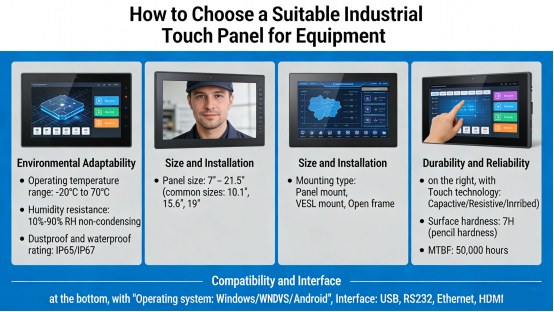
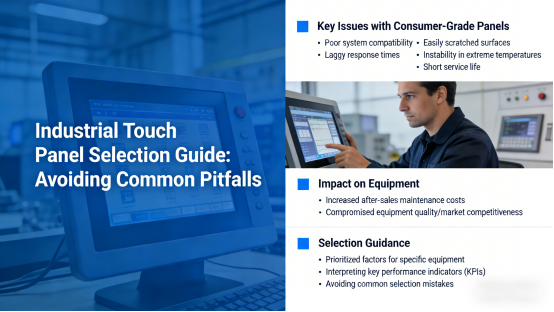
When designing or upgrading industrial equipment, one easily overlooked component can directly impact operational stability and user experience: the industrial touch panel. Many equipment engineers and buyers initially opt for ordinary consumer-grade touch panels, only to encounter frustrating issues post-installation: poor system compatibility, laggy response times, easily scratched surfaces, instability in extreme temperatures, and a short service life.
These problems don’t just drive up after-sales maintenance costs—they also compromise the overall quality of the equipment and its competitiveness in the market. For professionals tasked with selecting components, avoiding these pitfalls starts with understanding what makes an industrial touch panel suitable for specific equipment.
In this article, we share practical, actionable guidance based on official product manuals and technical standards: what factors to prioritize when choosing an industrial touch panel for your equipment, how to interpret key performance indicators, and how to steer clear of common selection mistakes. All content is factual, free of exaggerated claims and marketing jargon—just professional insights to help you make informed decisions.
1. Match Touch Technology to Your Working Scene (Critical First Step)
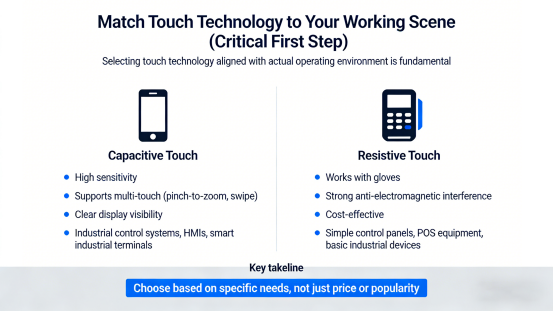
The first and most fundamental step is selecting touch technology that aligns with your actual operating environment. There is no “one-size-fits-all” solution—different scenarios demand different features to ensure reliability.
- Capacitive Touch: Boasts high sensitivity, supports multi-touch (e.g., pinch-to-zoom, swipe), and delivers clear display visibility. Ideal for industrial control systems, human-machine interfaces (HMIs), and equipment requiring smooth, intuitive operation (e.g., smart industrial terminals).
- Resistive Touch: Works seamlessly with gloves, offers strong anti-electromagnetic interference, and is cost-effective. Perfect for simple control panels, POS equipment, and basic industrial devices where complex inputs are not required.
The key takeaway: Choose based on your specific needs, not just price or market popularity. A high-end capacitive panel is unnecessary for a basic control device, while a resistive panel will hinder efficiency for complex HMI systems.
2. Key Indicators That Directly Impact Long-Term Stability
When evaluating industrial touch panels, focus on these core indicators—they determine whether the panel can operate stably for years in harsh industrial settings, reducing downtime and replacement costs:
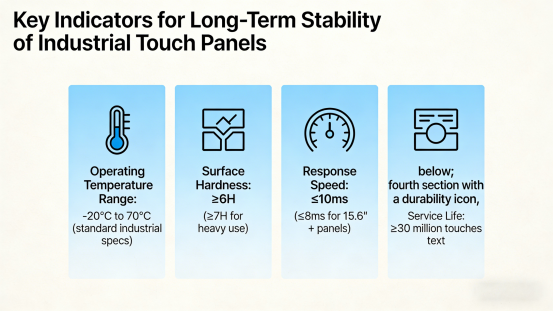
Operating Temperature Range
Industrial equipment often operates in environments with extreme temperature fluctuations (e.g., freezing warehouses, hot manufacturing workshops). Consumer-grade touch panels typically fail between -5°C and 40°C, while a reliable industrial touch panel should support a working temperature range of -20°C to 70°C (per standard industrial specifications) to ensure consistent performance in all conditions.
Surface Hardness
Industrial environments are prone to scratches, friction, and accidental impacts from tools or debris. A durable industrial touch panel should have a surface hardness of ≥6H (preferably ≥7H for heavy-use scenarios). This level of hardness resists scratches and daily wear, maintaining clear display visibility and extending the panel’s lifespan.
Response Speed
For equipment requiring efficient operation (e.g., industrial control terminals, automated systems), slow response times lead to inefficiencies and user frustration. A suitable industrial touch panel should have a response time of ≤10ms (≤8ms for larger panels, 15.6”+) to ensure smooth, accurate operation without lag.
Service Life
A long service life reduces the frequency of replacements, lowers maintenance costs, and improves overall equipment reliability. Look for an industrial touch panel with a touch life of ≥30 million operations—far more durable than consumer-grade panels (which typically last 1-2 million touches).
3. Compatibility: More Critical Than Appearance or Size
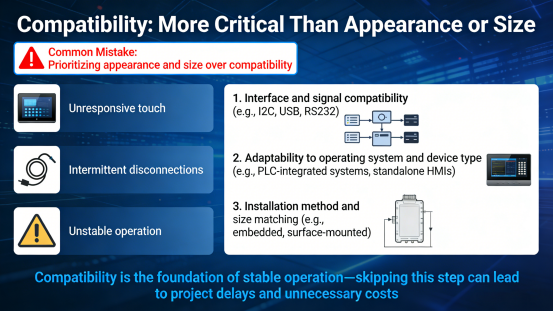
One of the most common mistakes buyers make is prioritizing appearance and size over compatibility. A visually appealing touch panel that doesn’t integrate with your equipment’s system, interface, or control module will cause costly issues: unresponsive touch, intermittent disconnections, and unstable operation.
Before making a selection, confirm these three compatibility checkpoints (per product manual guidelines):
- Interface and signal compatibility (e.g., I2C, USB, RS232) with your equipment’s control system.
- Adaptability to your equipment’s operating system and device type (e.g., PLC-integrated systems, standalone HMIs).
- Installation method and size matching (e.g., embedded, surface-mounted) to avoid rework or fit issues.
Compatibility is the foundation of stable operation—skipping this step can lead to project delays and unnecessary costs.
4. 3 Common Mistakes to Avoid (Save Time & Money)
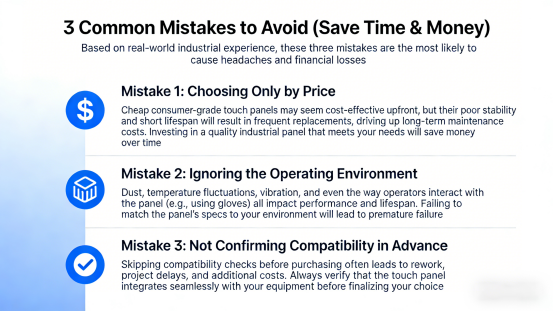
Based on real-world industrial experience, these three mistakes are the most likely to cause headaches and financial losses. Avoid them to streamline your selection process and choose a touch panel that lasts:
Mistake 1: Choosing Only by Price
Cheap consumer-grade touch panels may seem cost-effective upfront, but their poor stability and short lifespan will result in frequent replacements, driving up long-term maintenance costs. Investing in a quality industrial panel that meets your needs will save money over time.
Mistake 2: Ignoring the Operating Environment
Dust, temperature fluctuations, vibration, and even the way operators interact with the panel (e.g., using gloves) all impact performance and lifespan. Failing to match the panel’s specs to your environment will lead to premature failure.
Mistake 3: Not Confirming Compatibility in Advance
Skipping compatibility checks before purchasing often leads to rework, project delays, and additional costs. Always verify that the touch panel integrates seamlessly with your equipment before finalizing your choice.
Conclusion: Choose Smart, Avoid Headaches
Selecting a suitable industrial touch panel for your equipment doesn’t have to be complicated. The key is to match the panel to your working scene, prioritize stability indicators, confirm compatibility, and avoid common selection mistakes.
This article is designed to help equipment engineers, buyers, and R&D personnel make more informed choices—reducing equipment failures, lowering maintenance costs, and improving overall operational stability and user experience.
No promotions, no sales pitches, no exaggerated claims—just professional, practical guidance based on official product manuals and industrial standards, to help you select the right industrial touch panel for your needs.