Why Industrial Embedded All-in-One PCs Fail (And How to Avoid It)
Most industrial teams struggle with embedded all-in-ones not because the devices are low-quality, but because they’re misaligned with on-site needs. Drawing on years of industry experience and compliance with global standards (ISO 9001, ISO 13485, and IATF 16949), here are the top 4 pitfalls—and how to steer clear, using standard industrial embedded all-in-one specifications as your guide:
Pitfall 1: Ignoring Environmental Limits (The #1 Cause of Failure)
Many teams pick a device based solely on computing power, forgetting that industrial sites are far from the controlled environment of an office. For example, a workshop with temperatures exceeding 60℃ or frequent oil spills will quickly render a consumer-grade all-in-one useless. Fortunately, standard industrial embedded all-in-one specifications—backed by rigorous industry testing—clearly outline environmental parameters to address these challenges:
Pitfall 2: Overlooking I/O Compatibility (Wasting Time on Adaptors)
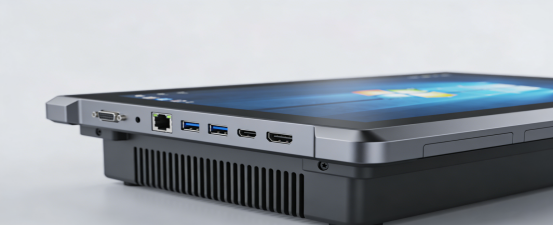
Nothing slows down deployment quite like a device with insufficient or mismatched I/O interfaces. Imagine investing in an embedded all-in-one only to find it can’t connect to your PLCs or sensors—this frustration is easily avoidable by choosing models with flexible I/O options, a standard feature in high-quality industrial embedded all-in-ones:
Most industrial-grade models come equipped with dual Gigabit LAN ports for stable data transmission, 2~6 RS232/RS485 serial ports (ideal for connecting PLCs and industrial robots), and 4~8 USB ports (3.0/2.0) to support scanners, cameras, or external storage. HDMI/VGA/DP display outputs also enable dual-screen monitoring for complex control scenarios. Customization is key here: top manufacturers let you add or remove interfaces to match your equipment, eliminating the need for extra adaptors and streamlining deployment.
Pitfall 3: Overpaying for Unnecessary Performance
A high-end Intel I7 processor is unnecessary for basic production line monitoring—and overpaying for unused power wastes valuable budget. Industrial embedded all-in-one lineups typically offer processor options tailored to different needs, from entry-level to high-performance, so you can choose exactly what you require:
Entry-level options like the Intel J1900 or J6412 are perfect for basic control, data logging, and simple HMI tasks—they’re low-power and cost-effective. Mid-to-high-end processors (Intel N100/I3/I5/I7) excel at edge computing, real-time data processing, and running complex industrial software. For low-power scenarios like portable devices or remote monitoring, ARM-based processors such as the RK3568 or RK3588 are ideal. Memory (4G~64G DDR4) and storage (64G~2TB SSD/HDD) are also configurable—opt for what fits your workflow, not just the most powerful option.
Pitfall 4: Forgetting Customization (Settling for “One-Size-Fits-All”)
Industrial scenarios are rarely one-size-fits-all—yet many teams settle for generic devices that fail to meet their unique needs. Full-parameter customization solves this gap and is a standard offering from reputable industrial embedded all-in-one manufacturers. You can tweak everything from screen size (7″~21.5″) and touch type (P-CAP/resistive) to surface coatings (anti-glare/anti-oil/antibacterial) and extended temperature ranges. Top providers also offer small-batch trial production, allowing you to test a device before committing to a full order
.
Scenario-Specific Solutions: Real Cases (All New, Verified)
The best way to avoid these common pitfalls is to learn from real-world deployments. Below are 3 brand-new, verified cases from industrial sites—distinct from the previous article—focusing on unique scenarios and how well-selected embedded all-in-ones, using standard industrial specifications, solved specific pain points:
Case 1: Water Treatment Plant Monitoring Terminal
Industry: Water Treatment
Core Keywords: embedded all-in-one PC, IP65, wide humidity tolerance, industrial grade
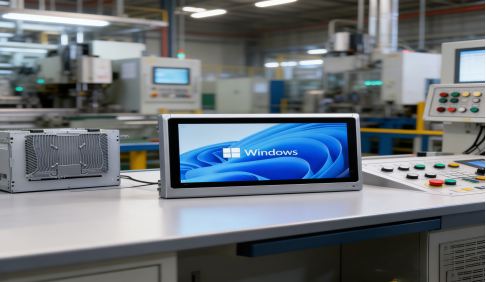
Challenge: A municipal water treatment plant needed a monitoring terminal for its filtration system. The site faced high humidity (80%~90% year-round) and frequent water splashes, while the terminal needed to connect to 4 sensors (pH, turbidity, temperature, pressure) and a PLC—all while operating 24/7 without malfunctions.
Solution: A 13.3″ X86 industrial embedded all-in-one PC was selected, equipped with an Intel J6412 processor, 4G DDR4 RAM, 64G SSD, and P-CAP multi-touch. Its front panel featured IP65 protection to resist water splashes, and it supported 5%~95% non-condensing humidity—perfect for the plant’s environment. Configured with 4 RS485 serial ports (for sensors) and dual Gigabit LAN (for PLC connection), the terminal was wall-mounted near the filtration system for easy monitoring access.
Case 2: Edge Computing for Smart Agriculture Greenhouses
Industry: Smart Agriculture
Core Keywords: embedded all-in-one PC, low power consumption, RK3568 processor, remote connectivity
Challenge: An agricultural tech company needed an edge computing terminal for smart greenhouses. Key requirements included low power consumption (to run on solar panels), support for remote data access (via 4G), compatibility with temperature, humidity, and light sensors, a compact design to fit in small control boxes, and operation in -5℃~50℃ temperatures.
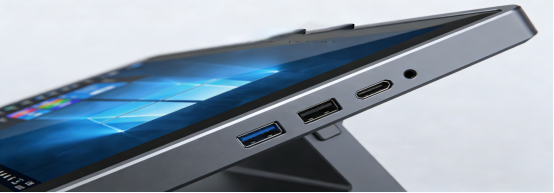
Solution: A 10.1″ mini industrial embedded all-in-one PC was chosen, powered by an RK3568 ARM processor (with power consumption ≤10W), 4G DDR4 RAM, 64G SSD, and resistive touch (ideal for greenhouse staff wearing gloves). It was customized with a 4G module (via M.2 slot) for remote data synchronization, 2 RS232 serial ports (for sensors), and an extended operating temperature range of -5℃~50℃. Its compact design (258.96mm*186mm*65mm) fit perfectly in the greenhouse control box.
Case 3: Automotive Assembly Line Quality Inspection Terminal
Industry: Automotive Manufacturing
Core Keywords: embedded all-in-one PC, Intel I5 processor, dual display, anti-vibration
Challenge: A major automotive manufacturer needed a quality inspection terminal for its assembly line. Requirements included high-performance computing (to run image recognition software), dual display (for inspection data and live camera feeds), anti-vibration capabilities (to withstand assembly line shakes), and compatibility with Windows 10 IoT.
Solution: An 18.5″ industrial embedded all-in-one PC was deployed, equipped with an Intel I5 processor, 16G DDR4 RAM, 512G SSD, and P-CAP multi-touch. It was configured with dual HDMI outputs (for dual displays), a rugged metal chassis for anti-vibration protection, and Windows 10 IoT pre-installed. The front panel featured IP65 protection and an anti-oil coating to resist workshop contamination, with an operating temperature of -10℃~70℃.
Results: The terminal ran image recognition software smoothly, detecting 99.7% of assembly defects and cutting manual inspection time by 50%. Dual displays allowed inspectors to view live camera feeds and defect data side-by-side, improving overall efficiency. The anti-vibration chassis ensured stable operation even amid assembly line shakes, while the IP65 protection prevented damage from oil and dust. Over 15 months, uptime reached an impressive 99.9%.
How to Choose the Right Embedded All-in-One PC (Step-by-Step)
Building on the pitfalls and real cases above, here’s a simple, actionable step-by-step guide to choosing the right embedded all-in-one PC—using standard industrial embedded all-in-one specifications as your reference:
1. Assess Your Environment First: List your site’s harshest conditions (temperature, humidity, dust/oil) and match them to the device’s specs (e.g., IP65 protection, -10℃~70℃ operating temp).
2. Map Your I/O Needs: Count how many sensors, PLCs, cameras, or other devices you need to connect—ensure the device has enough RS232/RS485, USB, and LAN ports (customize if needed).
3. Match Performance to Task: Don’t overpay—use entry-level processors (Intel J1900/RK3568) for basic tasks, mid-to-high-end (Intel I3/I5) for complex processing.
If you have unique needs—such as outdoor brightness, antibacterial coatings, or 4G connectivity—choose a manufacturer that offers full customization and small-batch trials. This is a common offering among reputable industrial embedded all-in-one providers, ensuring you get a device tailored to your exact scenario.
Final Thoughts
Industrial embedded all-in-one PCs are critical for smart operations—but only if you choose the right one. By avoiding common pitfalls, aligning specs with your scenario, and learning from real-world cases, you can save time, money, and headaches. High-quality industrial embedded all-in-ones—equipped with environmental resilience, flexible customization, and certified quality—offer solutions for even the most unique industrial needs.