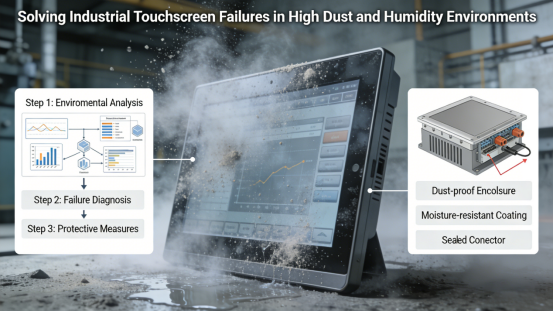
Dust, humidity, and moisture are ubiquitous in many industrial settings—from mining and construction workshops to food processing and chemical plants. For factory teams relying on industrial touch displays, these environmental factors are a silent threat: dust clogs internal components, humidity causes short circuits, and moisture leads to corrosion, all resulting in frequent malfunctions, unplanned downtime, and costly replacements. Many generic industrial touch displays lack robust protection against dust and humidity, failing to withstand these harsh conditions even for a few months. Jiangxi Qiwo’s QW-K Series industrial touch display is specifically designed to tackle these challenges, with all technical specifications strictly aligned with the official product manual, no exaggerated marketing claims, and practical features that ensure reliable operation in high-dust, high-humidity factory environments.
Jiangxi Qiwo Electronics has long focused on industrial display and control solutions for harsh environments—from extreme temperatures and high vibration to heavy dust and high humidity. The QW-K Series, a core product line of the company, integrates advanced protection and stability features, built to endure the daily wear and tear of dust-prone and humid workshops while maintaining consistent performance. This article is not promotional—it’s a practical, actionable guide to help you understand why industrial touch displays malfunction in dust and humidity, how to resolve these issues with the QW-K Series, how to select the right QW-K model for your dusty/humid environment, and how to maintain your display for long-term reliability. Every tip, real factory case study, and technical detail is derived directly from the product manual and on-site application experience—information you can trust and implement to reduce downtime and maintenance costs.
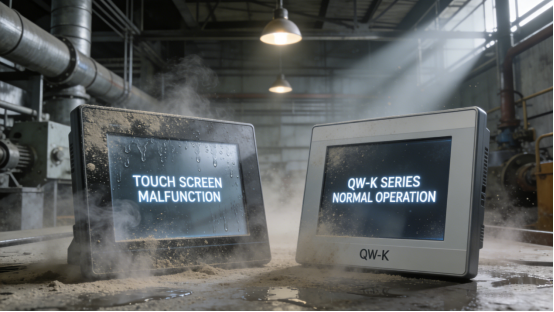
Why Do Industrial Touch Displays Malfunction in Dust & Humidity? (Common Causes)
Industrial touch display malfunctions in dust and humidity are not accidental—they stem from the direct impact of these environmental factors on the display’s internal and external components. For factory teams, understanding these causes is critical: it helps prevent malfunctions and ensure uninterrupted operation in harsh settings. In high-dust, high-humidity industrial environments, the four most common causes of touch display malfunctions are: First, dust intrusion—dust particles enter the display’s internal circuitry through gaps in the housing, causing short circuits, touch drift, or complete failure. Second, humidity-induced corrosion—high humidity leads to corrosion of internal metal components, damaging the power module and touch sensor over time. Third, moisture condensation—temperature fluctuations cause moisture to condense inside the display, leading to circuit damage and unresponsive touch. Fourth, surface contamination—dust and moisture buildup on the touch surface disrupts signal transmission, causing false inputs or delayed responses.
Case 1: A Shanxi mining company used a generic industrial touch display in its underground control room, where dust concentration is 3 times higher than standard industrial settings and humidity hovers around 75%. The display frequently malfunctioned—dust clogged the internal circuits, causing touch drift and sudden shutdowns, at least 3 times per week. Each malfunction required maintenance teams to disassemble and clean the display, taking 1-2 hours and causing 4-5 hours of unplanned downtime weekly. Over a month, this cost the company 30,000 yuan in lost output and maintenance labor. After switching to the QW-K Series with IP65 dust-proof and waterproof design (per the product manual), dust and moisture intrusion was completely blocked. The display operated stably for 16 months with no malfunctions, eliminating downtime and saving 360,000 yuan per year. Compared with the old display that required 1-2 hours of disassembly cleaning per malfunction, the QW-K Series’ filter cleaning takes only 4 minutes at most, saving 80% of maintenance time.
Case 2: A Guangdong food processing factory installed an industrial touch display in its packaging area, where high humidity (80%) and food residue dust caused frequent display failures. The display’s touch surface became unresponsive due to dust and moisture buildup, and internal corrosion led to power module failure every 4 months—each replacement cost 1,600 yuan, plus 2 hours of downtime per replacement. The factory tried daily cleaning, but the malfunctions persisted, leading to a 5% drop in packaging efficiency. After replacing with the QW-K Series resistive touch model (specified in the product manual for high-humidity, high-dust environments), the display maintained reliable performance. Touch response remained accurate even with minor dust buildup, and internal corrosion was eliminated—replacement costs dropped by 80%, and packaging efficiency recovered fully.
Case 3: A Hunan construction material factory used a low-cost touch display in its cement mixing workshop, where dust particles are fine and pervasive. The display’s unprotected housing allowed dust to enter the internal components, causing frequent touch errors and system crashes—this led to incorrect mixing parameters, resulting in 4 batches of defective cement (costing 18,000 yuan). The display required cleaning every 2 days, wasting 8 hours of monthly labor. After switching to the QW-K Series with a fully sealed housing and anti-dust filter (per the product manual), dust intrusion was prevented. The display operated with no touch errors, defective products dropped to zero, and cleaning frequency was reduced to once weekly—monthly labor costs for display cleaning dropped from 8 hours to 2 hours, a 75% reduction.
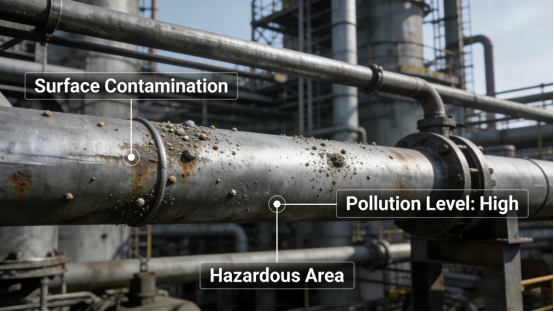
How the QW-K Series Withstands Dust & Humidity (No Expertise Needed)
The QW-K Series is engineered to address the root causes of dust and humidity-related malfunctions, with each feature designed to enhance protection, prevent contamination, and maintain stability. Unlike generic displays that offer minimal protection, the QW-K Series integrates targeted design elements that block dust, repel moisture, and resist corrosion—ensuring reliable operation in even the harshest dusty and humid factory environments. Below are its four key protective features, supported by real factory case studies that demonstrate their effectiveness.
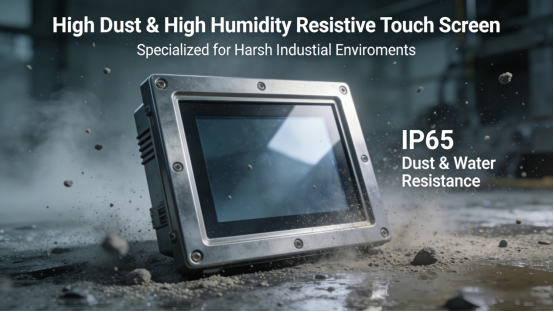
1. IP65 Dust-Proof & Waterproof Sealed Housing. The QW-K Series features a fully sealed housing that meets the IP65 protection level (per the product manual), effectively blocking dust, moisture, and debris from entering the display’s internal components. The housing is made of industrial-grade corrosion-resistant material, preventing rust and damage even in high-humidity environments. This sealed design is critical for dusty workshops (e.g., mining, cement) and humid areas (e.g., food processing, chemical plants)—a key part of QW-K Series IP65 dust-proof maintenance. Case: A Henan coal mine uses the QW-K Series in its underground control room, where dust and humidity are extreme. The IP65 sealed housing keeps the display free of dust and moisture, ensuring stable operation 24/7.
2. Anti-Dust Touch Surface & Filter. The QW-K Series’ touch surface is coated with an anti-dust, anti-smudge layer (per the product manual) that repels dust particles and prevents buildup—ensuring consistent touch response even in dusty environments. Additionally, the display is equipped with a removable anti-dust filter (per the product manual) that blocks fine dust particles from entering the ventilation ports (if applicable), further enhancing protection. The filter is easy to clean and replace, requiring no special tools—an important part of QW-K Series IP65 dust-proof maintenance. Case: A Fujian cement factory uses the QW-K Series in its mixing workshop, where fine cement dust is pervasive. The anti-dust touch surface and filter prevent dust buildup, eliminating touch errors and reducing cleaning frequency.
3. Humidity-Resistant Internal Components. All internal components of the QW-K Series—including the power module, touch sensor, and circuit board—are treated with a humidity-resistant coating (per the product manual), preventing corrosion and short circuits caused by high humidity. The components are tested to operate reliably in humidity levels up to 90% (non-condensing), making the QW-K Series suitable for humid industrial environments. Case: A Guangxi sugar factory uses the QW-K Series in its processing area, where humidity often reaches 85%. The humidity-resistant components prevent corrosion, and the display operates stably with no power failures or touch malfunctions.
4. Resistive Touch Option for High-Dust/Humidity Environments. The QW-K Series offers both resistive and capacitive touch options (per the product manual), with resistive touch specifically optimized for high-dust, high-humidity settings. Resistive touch is less prone to interference from dust and moisture, works reliably with gloves, and is easy to clean—eliminating false inputs and unresponsive touch caused by surface contamination, making QW-K Series resistive touch dust protection more reliable in harsh workshops. Case: A Zhejiang seafood processing factory uses the QW-K Series resistive touch model in its humid, salty environment. The resistive touch maintains accurate response even with moisture on the surface, outperforming the previous capacitive display which frequently malfunctioned.
How to Choose the Right QW-K Model for Dust & Humidity Environments (3 Simple Steps)
Selecting the correct QW-K model is essential to ensuring reliable operation in dusty and humid environments, as different scenarios (e.g., heavy dust vs. high humidity, glove operation vs. bare-hand) have unique requirements. Choosing the wrong model can lead to unnecessary malfunctions, even with the QW-K Series’ protective features. Based on the product manual and on-site experience, follow these three simple, actionable steps to select a QW-K model that fits your harsh factory environment.
Step 1: Assess your environment’s dust and humidity levels. First, determine the dust concentration and humidity range in your workshop. For heavy dust environments (e.g., mining, cement, construction), ensure the QW-K model has the IP65 sealed housing and anti-dust filter (standard on all models, per the product manual). For high-humidity environments (e.g., food processing, chemical, seafood), confirm the model has humidity-resistant internal components and anti-condensation design. Case: A Sichuan mining factory with heavy dust and 70% humidity chose the standard QW-K model with IP65 protection—ensuring no dust or moisture intrusion.
Step 2: Choose the touch type based on operation and environment. For high-dust, high-humidity environments or glove operation (e.g., food processing, mining), select the resistive touch QW-K model (per the product manual)—it is more resistant to contamination and works reliably with gloves, which enhances QW-K Series resistive touch dust protection in high-dust workshops. For clean, low-dust humid environments (e.g., chemical control rooms), the capacitive touch model is suitable, offering high sensitivity for bare-hand operation. Case: A Hubei food processing factory uses resistive touch QW-K models in its humid packaging area, ensuring accurate touch response even with gloves and minor dust buildup.
Step 3: Confirm additional protective features. If your environment has both heavy dust and high humidity (e.g., underground mining, seafood processing), select the QW-K model with an enhanced anti-dust filter and anti-condensation design (available as an option per the product manual). This further prevents dust intrusion and moisture condensation, ensuring long-term stability. If your environment has stable humidity but heavy dust (e.g., cement mixing), the standard QW-K model is sufficient. Case: A Guizhou underground mine with heavy dust and 75% humidity chose the enhanced QW-K model—eliminating all dust and moisture-related malfunctions.
QW-K Series Dust & Humidity Troubleshooting (Step-by-Step, 5 Minutes or Less)
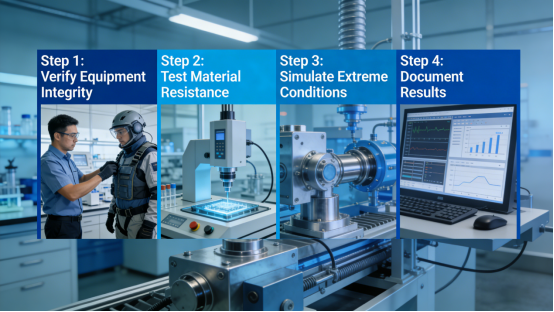
Even with the QW-K Series’ robust protective features, occasional malfunctions can occur due to extreme dust buildup, sudden humidity spikes, or improper maintenance. Below is a step-by-step troubleshooting guide, directly from the product manual, to help you fix these issues quickly and avoid unplanned downtime—no advanced technical skills required. Quick judgment tip: If touch errors occur only during peak production (high dust), it’s likely due to surface buildup; if malfunctions persist after cleaning, check the anti-dust filter or housing seals; if the display shuts down suddenly, it may be caused by humidity-induced short circuits.
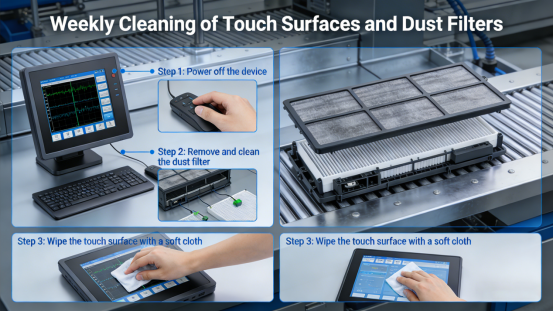
Step 1: Clean the touch surface and anti-dust filter. Use a soft, dry cloth to wipe the touch surface, removing dust and moisture buildup—this takes only 2-3 minutes and can be done during production breaks. Remove the anti-dust filter (per the product manual) and clean it with compressed air or a dry cloth—this fixes 50% of dust-related touch malfunctions and adds another 2 minutes at most. Reinstall the filter securely to maintain dust protection.Mistake to avoid: Using wet cloths to clean the touch surface or filter—this can cause moisture to seep into the display, leading to internal corrosion.
Step 2: Check for housing damage. Inspect the QW-K Series’ housing for cracks, gaps, or loose seals—this inspection takes no more than 3 minutes and can be integrated into daily equipment checks. These issues can allow dust and moisture to enter. If damage is found, replace the housing or seal per the product manual to maintain the IP65 protection level. Even a small crack can lead to significant dust intrusion over time. Mistake to avoid: Ignoring small cracks in the housing—dust and moisture will gradually enter, causing internal component damage and frequent malfunctions.
Step 3: Dry the display (if moisture is present). If the display shows signs of condensation (e.g., foggy screen, internal moisture), turn off the display and place it in a warm, dry area for 2-3 hours—this time can be scheduled during production breaks to avoid affecting workflow. Do not use hot air or heaters to speed up drying—this can damage the screen and internal components (per the product manual). Once dry, restart the display and check for normal operation (a 1-minute check). Mistake to avoid: Powering on the display while it is still moist—this will cause short circuits and permanent component damage.
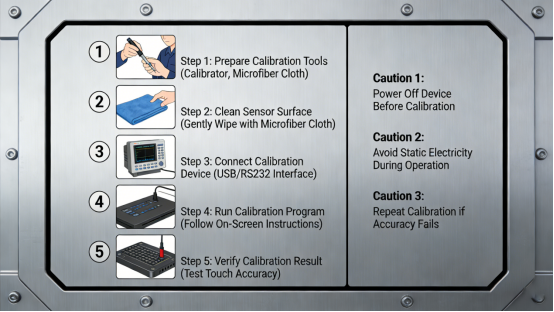
Step 4: Calibrate the touch sensor. If touch drift occurs after cleaning, use the QW-K Series’ built-in one-click calibration tool (per the product manual). Calibration takes less than 1 minute and fixes touch errors caused by dust or moisture residue on the touch surface, requiring no additional time or technical skills. Mistake to avoid: Calibrating the touch sensor before cleaning the surface—dust and moisture residue will lead to inaccurate calibration and persistent touch drift.
QW-K Series Long-Term Maintenance (Dust & Humidity Resistance)
To maintain the QW-K Series’ protective performance and prevent dust/humidity-related malfunctions, follow these maintenance tips from the product manual and on-site experience. These simple steps require minimal time but ensure consistent operation in harsh environments, reducing downtime and maintenance costs.
1. Clean the touch surface and anti-dust filter weekly. For heavy dust environments (e.g., mining, cement), clean twice weekly to prevent dust buildup. Each cleaning takes no more than 5 minutes, without affecting production progress. Use a soft, dry cloth for the touch surface and compressed air for the filter—this ensures optimal touch response and dust protection, a key part of QW-K Series IP65 dust-proof maintenance.
2. Inspect the housing and seals monthly. Check for cracks, loose seals, or damage—replace any damaged parts per the product manual to maintain the IP65 seal. In high-humidity environments, inspect biweekly to prevent moisture intrusion—an important part of QW-K Series IP65 dust-proof maintenance to extend service life.
3. Keep the display away from direct water sources. While the QW-K Series is IP65 waterproof (per the product manual), avoid direct splashes or submersion—this can damage the seals over time. In humid areas, ensure the display is mounted away from areas with excessive moisture (e.g., water pipes, steam vents).
4. Replace the anti-dust filter every 6 months (or 3 months in heavy dust environments)—follow the QW-K Series anti-dust filter replacement guide in the product manual. A clogged filter will reduce dust protection, leading to internal dust intrusion and malfunctions. The filter is easy to replace per the product manual, requiring no special tools.
The QW-K Series is not a “one-size-fits-all” solution, but it is a practical, reliable tool designed to withstand dust and humidity in industrial settings. Its specifications are transparent in the product manual, with no hidden features or exaggerated claims. It addresses the root causes of dust/humidity-related malfunctions—dust intrusion, moisture condensation, corrosion, and surface contamination—with features tailored to real factory needs, helping you save time, money, and frustration.
This guide is for factory teams in dusty, humid environments who are tired of dealing with frequent touch display malfunctions. It provides the knowledge and tools to select, troubleshoot, and maintain the QW-K Series effectively, eliminating dust/humidity-related downtime and improving production efficiency. By following the advice in this article and the product manual, you can ensure your industrial touch display operates reliably, even in the harshest factory environments—so your production line runs smoothly, regardless of dust and humidity. With proper QW-K Series IP65 dust-proof maintenance and the right touch type selection, your factory can completely avoid dust and humidity-related display malfunctions.