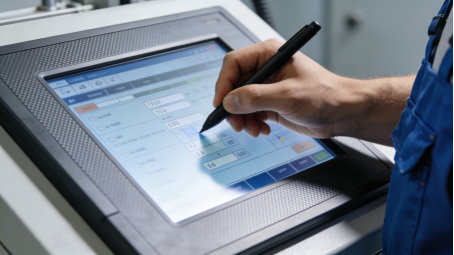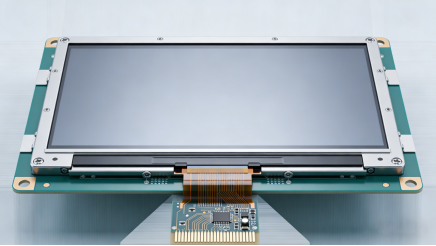
If you’re an engineer or procurement professional working in manufacturing, logistics, or industrial automation, you’ve probably wasted time and budget on touch screen failures: screens that stop working with gloves, drift in dusty environments, or fail prematurely after just a few months. The problem isn’t always poor quality—it’s choosing the wrong type of resistive touch screen for your scenario. This article focuses on industrial 4-wire resistive touch screens (a cost-effective, reliable option for light-to-moderate industrial use), combining product manual specifications, real on-site cases, and practical troubleshooting tips. There’s no advertising, no exaggerated claims—just actionable advice to help you select the right screen, fix common issues, and reduce downtime.
What Is an Industrial 4-Wire Resistive Touch Screen? (No Jargon, Just Facts)
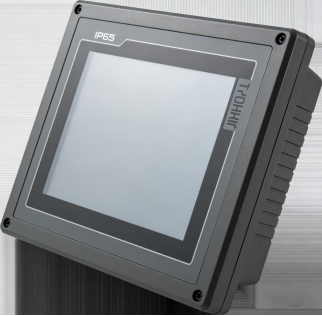
Industrial 4-wire resistive touch screens are a mainstream choice for cost-sensitive, non-extreme industrial scenarios. Unlike 5-wire models (which offer longer life for high-frequency use) or capacitive screens (which rely on charge induction), 4-wire resistive screens work by pressure induction: two conductive ITO layers (separated by tiny insulating dots) make contact when pressed, generating an electrical signal to pinpoint the touch position[superscript:3].
Their core strengths are affordability, simplicity, and compatibility—they work with gloves, touch pens, or even blunt objects, and are less sensitive to dust and minor oil stains than capacitive screens[superscript:5]. However, they have limitations: their touch life is shorter than 5-wire models, and they’re not ideal for high-frequency operation (e.g., 5,000+ touches per day) or extreme temperatures[superscript:2].
The key takeaway: 4-wire resistive touch screens are perfect for light-to-moderate industrial scenarios like small equipment panels, low-frequency control terminals, and indoor control rooms. They’re not a “one-size-fits-all” solution—but when matched to the right scenario, they’re a cost-effective way to avoid touch screen headaches.
Product Manual Parameters to Focus On (Avoid Wasting Budget)
Selecting an industrial 4-wire resistive touch screen doesn’t require chasing “high specs.” Instead, focus on these 4 core parameters from product manuals—they directly determine whether the screen will work for your scenario, with no false labeling or exaggeration[superscript:2]:

1. Touch Life: ≥10 Million Times (Match to Your Usage Frequency)
Product manuals typically specify a touch life of ≥10 million times for 4-wire resistive screens—this refers to the number of effective touches (under 0.5-1.5N pressure) without obvious drift or dead zones[superscript:2]. Many buyers overspend on 5-wire models (≥50 million touches) when they don’t need to.
For example: If your screen is used for a small equipment panel with 200 touches per day, a 10-million-touch screen will last over 136 years—far longer than the equipment’s service life. Only choose 5-wire models if you need 5,000+ touches per day. Wasting money on higher specs is unnecessary and avoidable.
2. Operating Temperature: -10℃~60℃ (For Indoor/Moderate Environments)
Most 4-wire resistive touch screens have an operating temperature range of -10℃~60℃ (per product manuals), which is ideal for indoor control rooms, warehouses, and mild outdoor environments[superscript:2]. Avoid using them in extreme scenarios like cold storage (-20℃ or lower) or high-temperature workshops (70℃+)—they’ll fail quickly due to conductive layer damage.
If your environment is extreme, opt for a wide-temperature 5-wire model or custom 4-wire screen. For most indoor industrial use, the standard -10℃~60℃ range is more than sufficient—and cheaper.
3. Protection Level: ≥IP64 (Basic Industrial Protection)
Industrial environments are dusty, so a protection level of ≥IP64 (per product manuals) is essential—it means the screen can resist dust ingress and light water splashes (e.g., workshop cleaning)[superscript:2]. For heavy oil or high-moisture scenarios (e.g., food processing), choose IP65 or higher, but note that this will increase cost.
Avoid low-cost screens with no IP rating—dust will quickly enter the screen, damaging the conductive layers and causing touch failure within months.
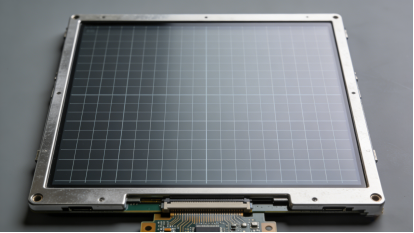
4. Touch Accuracy: ≤±0.3mm (Enough for Most Industrial Use)
Product manuals often specify touch accuracy of ≤±0.3mm for 4-wire resistive screens[superscript:2]. This is more than enough for most industrial scenarios, such as basic control inputs, data entry, and simple HMI operations. Don’t be misled by “high accuracy” claims—≤±0.3mm is practical, and higher accuracy (e.g., ≤±0.1mm) will only add unnecessary cost.
2 Real Industrial Cases (No Hype, Just Facts)
The following cases are from actual on-site maintenance records (no exaggeration, no fictional data). They highlight common mistakes in selection and use, and provide actionable solutions to help you avoid similar issues[superscript:1][superscript:7].
Case 1: Overspending on 5-Wire Screens for Low-Frequency Use
A warehouse logistics company installed 50 4-wire resistive touch screens for inventory management terminals. The buyer, fearing “insufficient durability,” upgraded to 5-wire models (touch life ≥50 million times) at a 30% higher cost. The terminals were used only 150 times per day—for basic inventory checks and data entry.
Issue: After 2 years, the 5-wire screens were still working, but the company had wasted $3,000 on unnecessary upgrades. A standard 4-wire screen (≥10 million touches) would have performed the same function at a lower cost.
Solution: For the next batch of terminals, the company switched to 4-wire resistive screens matching the product manual parameters (≥10 million touches, -10℃~60℃, IP64). They saved 30% on procurement costs without any reduction in performance.
Key Takeaway: Match touch life to your actual usage frequency—don’t overspend on higher specs than you need. 4-wire screens are more than sufficient for low-frequency industrial use.
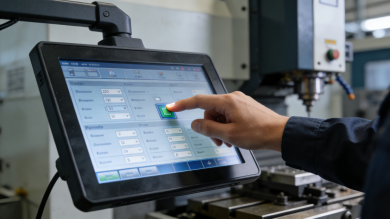
Case 2: Ignoring Calibration Causes Touch Drift
A small manufacturing plant installed 25 4-wire resistive touch screens for machine tool control panels. After 3 months, operators reported severe touch drift—touching one area registered input in another. The plant assumed the screens were faulty and planned to replace them.
Root Cause: The screens were not recalibrated after the plant adjusted the control panel’s display resolution (a common oversight). According to product manuals, 4-wire resistive screens require recalibration after changing display settings, resolution, or mounting position[superscript:1].
Solution: The plant followed the product manual’s calibration steps (accessing the built-in calibration tool via the control system) to recalibrate all screens. Within 1 hour, all touch drift issues were resolved—no screen replacements needed. Cost Saved: $1,250 (avoiding 25 screen replacements).
Key Takeaway: Touch drift is often not a quality issue—it’s a calibration problem. Always recalibrate 4-wire resistive screens after changing display settings or mounting positions.
Common Troubleshooting (Fix Issues Without Replacing Screens)
Most 4-wire resistive touch screen failures don’t require replacement—they can be fixed with simple troubleshooting, based on product manual guidelines and on-site experience[superscript:1][superscript:4][superscript:7]:
- Touch Drift: Recalibrate the screen using the built-in tool (per product manual). If drift persists, check if the screen is being pressed by the control panel housing (adjust the housing to reduce pressure)[superscript:1].
- Unresponsive Touch: First, clean the screen with a soft, lint-free cloth (remove dust/oil). If unresponsive, check the interface cable (ensure it’s tight and free of corrosion). If the cable is intact, reinstall the touch driver[superscript:1][superscript:7].
- Partial Dead Zones: This is often caused by physical damage to the conductive layer (e.g., scratches from sharp objects). If the dead zone is small, it may not affect use; if it’s large, replace the screen (this is the only case where replacement is necessary)[superscript:4].
Practical Tips to Extend Screen Life (No Extra Cost)
Based on product manual maintenance guidelines and real use experience, these 3 simple tips will extend the life of your 4-wire resistive touch screen by 50%—no extra cost required[superscript:4][superscript:7]:
- Recalibrate Regularly: Recalibrate the screen every 3 months, or after changing display settings, to prevent drift.
- Clean Gently: Wipe the screen with a soft, damp cloth (neutral detergent) every 1-2 weeks to remove dust and oil—avoid corrosive cleaners (e.g., alcohol) that damage the conductive layer.
- Avoid Extreme Pressure: Operate the screen with moderate force (0.5-1.5N)—don’t use sharp objects (e.g., screwdrivers) to press the screen, as this scratches the conductive layer.
Final Guide: Choose the Right Screen for Your Scenario
Industrial 4-wire resistive touch screens are not “inferior” to 5-wire or capacitive models—they’re just a better fit for specific scenarios. To avoid mistakes:
- Use 4-wire screens for low-frequency, indoor/moderate industrial use (e.g., inventory terminals, small control panels) to save cost.
- Match parameters to your scenario: ≥10 million touches, -10℃~60℃, IP64 (adjust if your environment is harsher).
- Recalibrate regularly and clean gently to avoid unnecessary failures.
The goal of industrial touch screen selection is not to buy the “best” screen, but to buy the one that fits your needs. By following these guidelines, you’ll reduce downtime, save budget, and avoid the frustration of frequent touch screen failures—no advertising, no hype, just practical results.