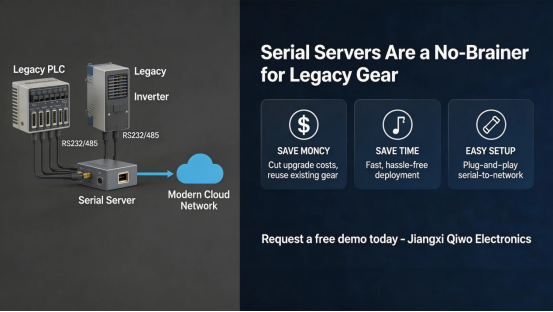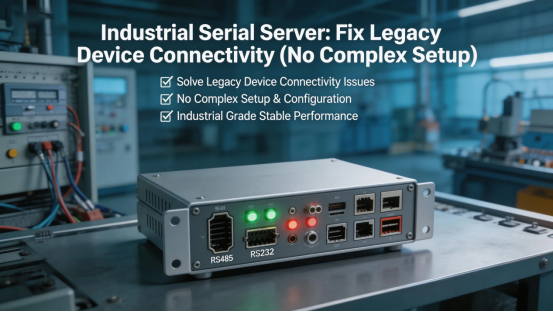
If you’ve ever dealt with legacy industrial equipment—think old sensors, printers, or control modules—you know exactly what I’m talking about. These devices still work like a charm, but they only have serial ports (RS-232, RS-485) and can’t hook up to your modern Ethernet network. That’s where an industrial serial server comes in—it’s the no-fuss fix to get your old gear talking to your new network, and you don’t need any fancy tech skills to use it.
I’ve talked to dozens of industrial teams who waste hours messing around with workarounds: running extra cables, using outdated adapters, or even ditching perfectly good legacy devices—all just because they can’t connect. The truth is, you don’t have to drop a ton of cash or tear apart your setup. An industrial serial server takes 10 minutes tops to set up, works with almost any legacy device, and saves you time, money, and a whole lot of frustration.
This isn’t some tech-heavy guide—just real-world tips for using industrial serial servers to fix those annoying connectivity headaches. We’ll skip the jargon, stick to what actually works, and show you exactly how this tiny device can make your old legacy equipment feel like new again.
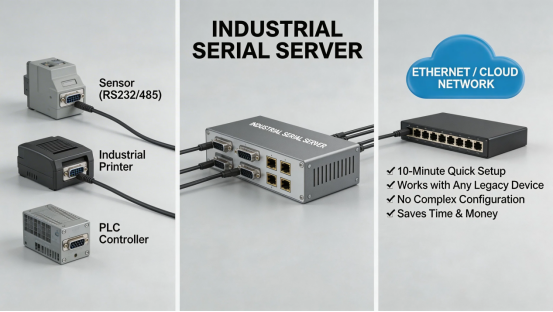
Why Legacy Devices Can’t Connect (And How Serial Servers Fix It, Easy)
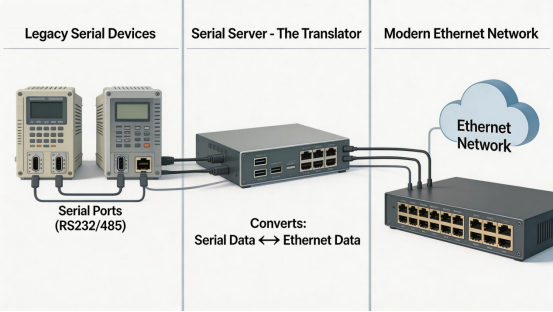
Let’s keep it super simple: Most modern industrial networks use Ethernet—it’s fast, reliable, and easy to scale. But older legacy devices—think ones from 5, 10, even 15 years ago—only have serial ports. These ports are slow, only work over short distances (like 50 feet max), and can’t connect to your Ethernet network on their own. That’s the main issue.
An industrial serial server acts like a “translator” between your legacy serial devices and your Ethernet network. It takes the serial data from your old equipment, turns it into Ethernet data, and sends it to your network. And it works both ways—your network can send commands to the legacy device through the serial server, too. No more messy workarounds, no more guesswork—just smooth, seamless connectivity.
The best part? You don’t have to get rid of your legacy devices. These older pieces of equipment are built to last—way longer than most modern gear—so why throw them away? A serial server lets you keep using what you already have, while hooking it up to your modern setup.
3 Real-World Headaches Industrial Serial Servers Fix (No Fluff, Just Results)
You might be thinking, “Do I really need one of these?” If you’re dealing with any of these common issues, the answer is a resounding yes. Here are three scenarios where an industrial serial server is a total game-changer—no fluff, just real results:
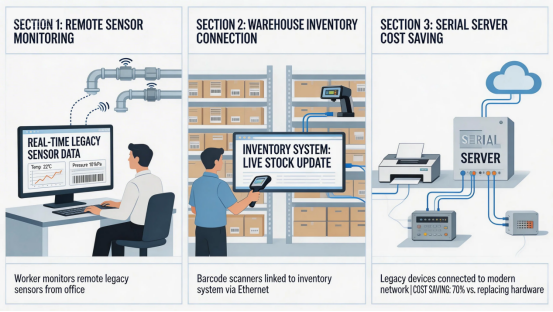
1. You Can’t Monitor Legacy Sensors Without Walking Across the Facility
Imagine you have old temperature or pressure sensors in your facility—they work great, but you have to trudge over to each one just to check the data. With an industrial serial to Ethernet server, you can hook those sensors up to your network and monitor them from your computer or phone. No more back-and-forth walking, no more manual data logging—just real-time updates, right at your fingertips.
For example, a manufacturing team was spending 2 hours a day checking legacy humidity sensors all over their warehouse. After adding serial servers, they monitor all sensors from their office—saving 10 hours a week (that’s 520 hours a year!) and cutting down on human error big time.
2. Your Serial Devices Are Too Far Apart to Connect
Serial ports only work over short distances—usually 50 feet or less. If your legacy devices are spread out across your facility (like a big warehouse or large plant), you can’t connect them with a standard serial cable. An industrial serial server fixes this by using Ethernet, which can send data hundreds of feet (or even miles, with the right setup).
A logistics team had legacy barcode scanners in different parts of their warehouse—they couldn’t hook them up to their inventory system because the serial cables were too short. Serial servers let them connect the scanners to their Ethernet network, so all inventory data syncs in real-time, no matter where the scanners are placed.
3. You’re Wasting Cash Replacing Good Legacy Gear
I’ve seen teams toss out perfectly good legacy printers, controllers, and sensors—all just because they can’t connect to their modern network. Replacing these devices costs thousands of dollars, and it’s totally unnecessary. An industrial serial server costs a fraction of that, works with your existing gear, and does the job just as well (if not better).
What to Look for in an Industrial Serial Server (Keep It Simple, No Jargon)
Not all industrial serial servers are the same—some are a pain to set up, some don’t work with certain legacy devices, and some can’t handle tough industrial environments. Here’s what to focus on (no tech jargon, just the stuff that matters):
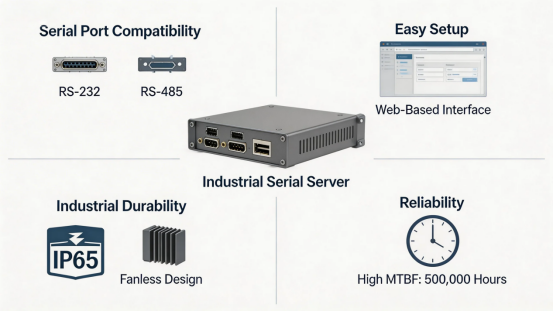
- Serial Port Compatibility: Make sure it supports the serial ports your devices use—most legacy gear uses RS-232 or RS-485. Top manufacturers like Jiangxi Qiwo Electronics offer servers that support both, so you don’t have to stress about compatibility.
- Easy Setup: Look for a server with a simple web interface—you should be able to get it up and running in 10-15 minutes, no IT degree needed. Steer clear of servers that require complicated software or coding.
- Industrial Durability: It needs to hold up in your facility—dust, heat, vibration, and wet conditions. Aim for IP65+ protection and a fanless design (no dust buildup, no overheating).
- Reliability: You don’t want a server that crashes or disconnects on you. Look for a server with a high MTBF (Mean Time Between Failures)—the higher the number, the more reliable it is.
Setup Tips: Get Your Serial Server Working in 10 Minutes (Promise)
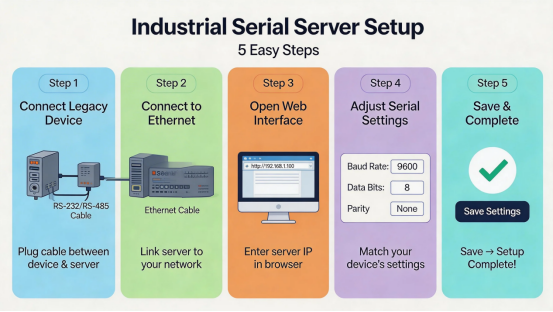
Setting up an industrial serial server isn’t complicated—I promise. Here’s a quick step-by-step, even if you’re not a tech whiz, to make your industrial serial server setup a breeze:
- Hook your legacy device to the serial server using a serial cable (RS-232 or RS-485).
- Connect the serial server to your Ethernet network using an Ethernet cable.
- Open the server’s web interface (just type its IP address into your browser—super easy).
- Adjust the serial settings (baud rate, data bits, parity) to match your legacy device (this info is usually in your device’s manual—no guesswork).
- Save the settings—and you’re done. Your legacy device is now connected to your network, no hassle.
Final Thought: Serial Servers Are a No-Brainer for Legacy Gear
Legacy industrial devices are built to last—don’t throw them away just because they can’t connect to your modern network. An industrial serial server is a cheap, simple fix that lets you keep using your existing gear, while adding the connectivity you need. It saves you time, money, and frustration, and it’s easy to set up—even if you’re not a tech expert.
Ready to fix your legacy device connectivity once and for all? Request a free demo today—Jiangxi Qiwo will show you how their industrial serial servers work with your specific devices, and help you pick the right one for your facility.