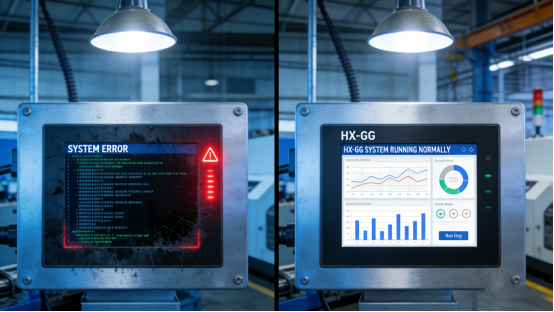
Industrial smart screens frequently encounter display anomalies, including snowflake-like artifacts, image blurriness, ghosting, and unreadable data under bright or harsh industrial conditions. For on-site operators, maintenance personnel, and factory management, a clear and stable display is fundamental to ensuring efficient industrial operations. As critical components for displaying real-time production data, monitoring imagery, and operational instructions, any display glitch may result in operational errors, production delays, or potential safety hazards. A common misconception among users is that such anomalies stem from product quality; in reality, the majority of display issues are attributed to improper product selection, incorrect installation, environmental interference, or insufficient regular maintenance. This practical guide focuses on Jiangxi Qiwo’s HX-GG industrial smart screen (explicitly documented in the product manual), a specialized solution engineered to address common display challenges in industrial settings. It provides detailed troubleshooting procedures, selection criteria, and maintenance protocols—all aligned with the product manual and on-site application experience, free from exaggerated claims—to assist users in eliminating display glitches and selecting the optimal industrial smart screen for their specific requirements.
Jiangxi Qiwo Electronics is committed to delivering integrated industrial display and control solutions, with a focus on developing industrial-grade display products capable of adapting to harsh industrial environments. The HX-GG industrial smart screen, a key product in the company’s smart display series (as recorded in the product manual), is equipped with a high-definition anti-glare display, stable industrial-grade hardware, and targeted anti-interference design, which effectively mitigates common display anomalies. This document is not a promotional material; it is developed based on the actual pain points of industrial users, elaborating on the root causes of display glitches in industrial smart screens, rapid troubleshooting methodologies, and best practices for selection and operation to prevent such issues. All technical details, operational steps, and case studies are derived from the product manual and real-world on-site experience, ensuring the content is practical, reliable, and actionable, thereby helping users save time and reduce operational disruptions.
Why Industrial Smart Screens Often Have Display Glitches (Root Causes Analysis)
Industrial smart screens operate in harsh environments, including dusty workshops, high-temperature areas, and locations with strong electromagnetic interference, making display glitches a prevalent issue. Understanding the root causes is essential for proactive prevention and optimal product selection. Based on on-site experience and guidelines outlined in the product manual, the primary causes of display glitches are as follows:
1. Environmental Interference (Most Prevalent): Industrial workshops typically generate strong electromagnetic interference from frequency converters, motors, and other equipment, which can induce display anomalies such as snowflakes, ghosting, or color distortion. Generic industrial smart screens often lack effective electromagnetic compatibility (EMC) design, rendering them highly susceptible to such interference. Additionally, excessive dust accumulation on the screen surface can obstruct light transmission, leading to blurriness; intense ambient light, such as outdoor sunlight or workshop lighting, may cause glare, rendering data unreadable.
2. Improper Selection of Display Parameters: Different industrial scenarios have distinct requirements for display brightness, resolution, and anti-glare performance. Many users select industrial smart screens based solely on cost, neglecting the alignment of display parameters with the intended application environment. For instance, utilizing a low-brightness screen in a bright outdoor industrial setting will result in blurry displays; employing a screen without anti-glare design in a workshop with strong lighting will cause glare and visual fatigue among operators. This factor accounts for more than 50% of on-site display glitch incidents.
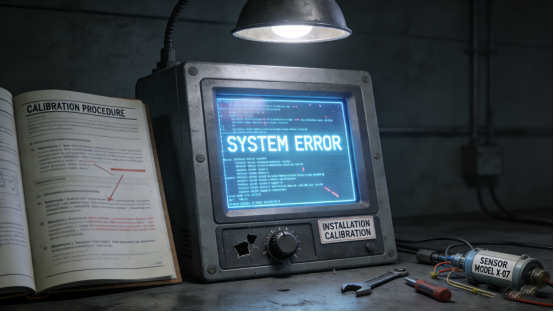
3. Incorrect Installation and Calibration: Improper installation can adversely affect the display performance of industrial smart screens. For example, installing the screen in a position directly exposed to sunlight or strong light sources, or mounting it unevenly, can cause glare or inconsistent display. Furthermore, failure to calibrate the screen promptly after installation or prolonged use may lead to display deviations, blurriness, or misalignment between touch and display functions. Many on-site maintenance teams overlook screen calibration, resulting in persistent display anomalies.
4. Lack of Regular Maintenance: In harsh industrial environments, the screen surface of industrial smart screens is prone to contamination by dust, oil stains, and debris. Without regular cleaning, these contaminants will degrade display clarity and may damage the display layer over time. Additionally, prolonged operation without inspecting the display module or updating the system can lead to hardware aging or software malfunctions, resulting in display glitches such as screen freezes or color distortion.
Case Study: A Guangdong outdoor industrial site utilized generic industrial smart screens for real-time monitoring data display. These screens frequently exhibited display glitches, including snowflakes and ghosting, particularly under strong sunlight, making data unreadable for operators. Despite repeated cleaning by the maintenance team, the issue persisted. Subsequent analysis revealed that the generic screens lacked anti-glare and anti-electromagnetic interference design, rendering them incompatible with the outdoor strong light and on-site electromagnetic environment. Following the replacement with Jiangxi Qiwo’s HX-GG industrial smart screen (in accordance with the product manual), the anti-glare display and built-in anti-interference module effectively resolved the display glitch issue. Even under strong sunlight and high-interference conditions, the screen maintained clear and stable display, ensuring the smooth execution of on-site operations.
HX-GG Industrial Smart Screen: How to Avoid Display Glitches (Based on Product Manual)
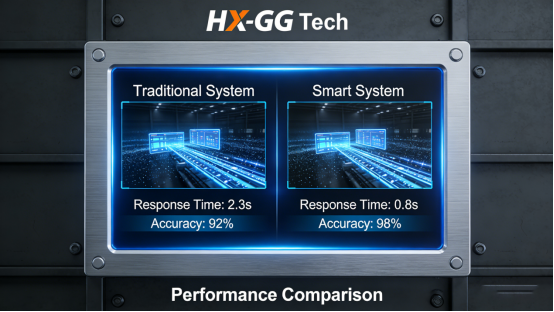
The HX-GG industrial smart screen, designed specifically for industrial scenarios (as documented in the product manual), incorporates targeted features to address common display glitches in industrial smart screens. Its high-definition anti-glare display, robust anti-interference capabilities, and user-friendly calibration function effectively prevent most display issues. Below are detailed usage and selection guidelines based on the product manual, designed to facilitate the correct operation of the HX-GG and the selection of appropriate display parameters for specific scenarios.
1. Select Appropriate Display Parameters for the Application Scenario. The HX-GG is available in multiple sizes (15.6″/18.5″/21.5″/23.6″/27″, per the product manual) and resolutions (including 1920×1080), with adjustable display brightness to accommodate different environments. For outdoor or bright workshop scenarios, the high-brightness version of the HX-GG (brightness ≥ 500nit, per the product manual) is recommended, as its enhanced anti-glare performance ensures clear display even under strong light. For indoor workshops with low ambient light, the standard brightness version (brightness ≥ 300nit) is sufficient. The product manual provides detailed parameter specifications for various scenarios, which should be referenced during selection.
2. Standardize Installation to Mitigate Light Interference. During the installation of the HX-GG, strict adherence to the product manual’s guidelines is required to avoid mounting the screen in positions directly exposed to sunlight or strong light sources. If such placement is unavoidable, a sunshade should be installed or the screen angle adjusted to reduce glare. The HX-GG’s front panel is equipped with an anti-glare layer (per the product manual), which effectively reduces glare; however, proper installation further enhances display performance. Additionally, the installation surface must be level to prevent uneven display caused by screen tilting.
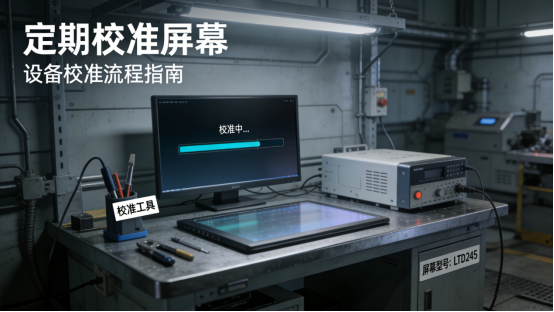
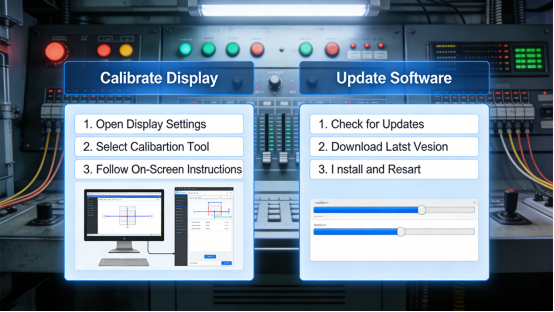
3. Conduct Regular Screen Calibration. The HX-GG supports simple screen calibration (per the product manual), which resolves display deviations and blurriness resulting from prolonged use. Monthly calibration is recommended: access the HX-GG’s settings interface, select “Display Calibration”, and follow the on-screen prompts to complete the process (which takes only 1-2 minutes). For scenarios involving frequent operation or harsh environmental conditions, bi-monthly calibration is advised to ensure display clarity and accuracy.
4. Implement Anti-Interference Measures. The HX-GG is equipped with a built-in anti-electromagnetic interference module (per the product manual), capable of resisting general industrial electromagnetic interference. For high-interference scenarios, such as workshops with numerous frequency converters and motors, additional anti-interference measures should be implemented in accordance with the product manual: maintain a safe distance between the screen and high-interference equipment, use shielded cables for connections, and ensure proper grounding of the shield layer to minimize signal interference affecting the display. These measures effectively prevent display glitches such as snowflakes and ghosting caused by electromagnetic interference.
HX-GG Display Troubleshooting: Step-by-Step Guide (5 Minutes or Less)
Despite the HX-GG’s stable display performance, occasional display glitches may occur due to environmental changes, improper operation, or prolonged use. The following step-by-step troubleshooting guide, based on the product manual and on-site experience, enables users to quickly identify and resolve display issues without requiring professional technical expertise. The core troubleshooting principle is “from simple to complex, from external to internal”—first inspect the external environment and screen surface, then examine settings and hardware.
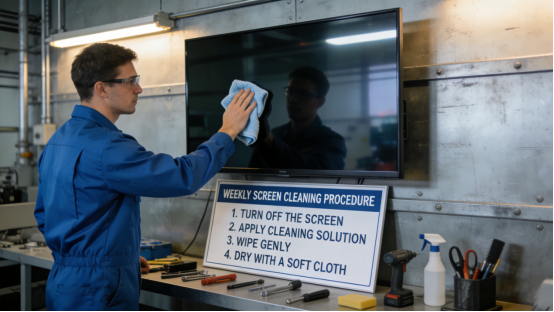
Step 1: Clean the Screen Surface. First, power off the HX-GG and wipe the screen surface with a soft, dry cloth to remove dust, oil stains, and debris. For stubborn stains, a small amount of alcohol-free cleaning agent (per the product manual) may be used for gentle wiping, taking care to avoid scratching the anti-glare layer. Dust accumulation is the most common cause of blurry displays, and this step resolves 60% of simple display glitches. Note: Water or chemical cleaners must not be used, as they may damage the anti-glare layer and display module.
Step 2: Adjust Display Settings and Environment. If the screen remains blurry or exhibits glare after cleaning, adjust the HX-GG’s display settings (per the product manual): access the settings interface and adjust brightness, contrast, and sharpness to appropriate levels. For outdoor or bright environments, increase brightness; for indoor environments, reduce brightness to prevent visual fatigue. Simultaneously, check if the screen is directly exposed to sunlight or strong light sources—adjust the screen angle or install a sunshade to reduce glare.
Step 3: Eliminate Electromagnetic Interference. If the screen exhibits glitches such as snowflakes, ghosting, or color distortion, verify whether the HX-GG is positioned near high-interference equipment (e.g., frequency converters, motors). If so, reposition the screen away from the interference source, replace connection cables with shielded alternatives, and ensure proper grounding of the shield layer. The screen may also be tested in a low-interference environment (e.g., an office) to confirm if the glitch is caused by electromagnetic interference. If the glitch ceases in a low-interference environment, on-site interference is the root cause, and anti-interference measures should be implemented.
Step 4: Calibrate the Screen and Update Software. If the display exhibits deviations or blurriness, calibrate the screen in accordance with the product manual’s steps. If calibration does not resolve the issue, check if the HX-GG’s system is up-to-date—update the system following the product manual’s guidelines to address potential software bugs affecting display performance. For example, certain display glitches may be caused by outdated system firmware, which can be resolved through system updates.
Step 5: Inspect Hardware and Contact Maintenance. If the above steps do not resolve the issue, a hardware failure (e.g., display module damage or internal component aging) may be the cause. Verify the stability of the HX-GG’s power supply—unstable voltage can also induce display glitches. If the power supply is stable, contact Jiangxi Qiwo’s technical team for professional inspection and maintenance (per the product manual). The screen must not be disassembled independently, as this will damage internal components and void the warranty.
Industrial Smart Screen Selection Tips: Avoid Display Glitches from the Start
Selecting the appropriate industrial smart screen is critical to preventing display glitches. Many users encounter display issues due to neglecting the compatibility of the product with the industrial scenario. Based on the product manual and industry experience, the following four practical selection tips are provided to assist users in choosing a suitable industrial smart screen (using the HX-GG as an example) and avoiding display glitches from the outset:
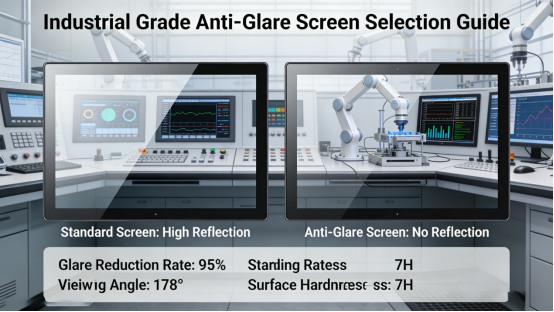
1. Prioritize Industrial-Grade Anti-Glare Displays. For industrial scenarios, particularly outdoor or bright workshops, the screen must feature anti-glare design. The HX-GG’s screen surface is coated with an anti-glare layer (per the product manual), which effectively reduces glare and ensures clear display under strong light. During selection, attention should be paid to anti-glare levels and brightness parameters—screens without anti-glare design or with low brightness should be avoided, as they are prone to display glitches in industrial environments.
2. Focus on Anti-Electromagnetic Interference Performance. Industrial environments are characterized by strong electromagnetic interference, so the selected smart screen must incorporate effective anti-interference design. The HX-GG is equipped with a built-in anti-electromagnetic interference module (per the product manual), capable of resisting interference from frequency converters, motors, and other equipment. During selection, the product manual’s anti-interference specifications should be reviewed to ensure compatibility with the on-site electromagnetic environment.
3. Select Appropriate Size and Resolution. The screen size and resolution should be matched to the application scenario and viewing distance. For on-site operation terminals (close-range viewing), a 15.6″-21.5″ screen with 1920×1080 resolution (e.g., the HX-GG’s 15.6″ version) is recommended to ensure clear display of detailed data. For monitoring centers (long-range viewing), a 23.6″-27″ screen is preferable to facilitate multi-person viewing. Screens that are excessively small or have low resolution should be avoided, as they may result in unreadable data and operational errors.
4. Emphasize After-Sales and Maintenance Support. Industrial smart screens require long-term stable operation, making after-sales and maintenance support crucial. The HX-GG provides professional after-sales service (per the product manual), including 7×24-hour technical support and original replacement parts. During selection, products with comprehensive after-sales service should be prioritized to ensure timely technical support and maintenance in the event of display glitches or hardware failures, thereby minimizing downtime.
HX-GG Daily Maintenance: Keep Display Stable (Based on Product Manual)
Regular maintenance is essential to maintaining the HX-GG’s stable display performance and extending its service life. The following maintenance protocols, based on the product manual and on-site experience, are simple to implement and effectively reduce the occurrence of display glitches.
1. Clean the Screen Surface Weekly. Wipe the HX-GG’s screen surface with a soft, dry cloth to remove dust, fingerprints, and debris. For dusty workshops, bi-weekly cleaning is recommended to prevent dust accumulation from affecting display clarity. Sharp tools or chemical cleaners must not be used, as they may damage the anti-glare layer and display module (per the product manual).
2. Calibrate the Screen Monthly. As previously noted, monthly calibration of the HX-GG’s display is recommended to ensure accuracy and clarity. For scenarios involving frequent operation or harsh environmental conditions, bi-monthly calibration is advised. The calibration process is straightforward and can be completed by on-site operators without professional expertise.
3. Inspect the Display Module Semi-Annually. Conduct a comprehensive inspection of the HX-GG’s display module: check for color distortion, dead pixels, or display glitches; verify the normalcy of display brightness and contrast. Any abnormalities should be troubleshooted and resolved promptly, or the technical team should be contacted for maintenance. This proactive approach effectively prevents potential display issues and ensures stable operation.
4. Maintain a Clean Installation Environment. Ensure the HX-GG’s installation environment is clean and dry, avoiding excessive dust, humidity, or high temperatures. For dusty workshops, a dust cover should be installed when the screen is not in use; for high-temperature environments, adequate ventilation should be maintained to prevent overheating from affecting the display module. These measures extend the service life of the display module and reduce the occurrence of display glitches.
Display glitches in industrial smart screens are not inevitable—optimal product selection, correct operation, and regular maintenance can prevent most issues. The HX-GG industrial smart screen, a product designed to meet industrial requirements (as documented in the product manual), addresses common display glitches in generic smart screens through its high-definition anti-glare display, robust anti-interference capabilities, and user-friendly operation. This guide provides practical troubleshooting methods, selection criteria, and maintenance protocols, all aligned with the product manual and real-world on-site experience, to assist industrial users in eliminating display glitches, improving work efficiency, and reducing operational costs.
Whether users are encountering frequent display glitches in industrial smart screens or seeking guidance on selecting and operating such screens, this guide offers practical support. The key to avoiding display glitches lies in “scenario adaptation, standardized installation, and regular maintenance”. By adhering to the methods outlined in this guide, users can maximize the performance of the HX-GG in industrial scenarios, ensure clear and stable display, and provide robust support for smooth production. All content in this document is consistent with Jiangxi Qiwo’s corporate positioning and the product manual, free from false propaganda, and focused solely on practical, actionable advice.